Almost everyone shopping for a Roblox laptop is shopping for the wrong thing. Roblox is not a demanding game by the standards of anything else you would buy a gaming laptop for, and the specification that decides whether it feels smooth is not the one most buying guides put in the headline.
Two workloads hide under the same brand name. Playing Roblox runs on hardware that would struggle with almost any other modern title. Building in Roblox Studio is a different job with its own published requirements, its own bottlenecks and its own platform restrictions. This guide separates them, then picks machines for each.
Editor’s Pick

Last update on 2026-10-22 / Affiliate links / Images from Amazon Product Advertising API
An HX-class processor with a high peak clock and a 144Hz panel covers both halves of Roblox — high framerates while playing and fast rebuilds in Studio — without paying for GPU power the engine will never ask for.
- Intel Core i7-13650HX
- NVIDIA GeForce RTX 5050 Laptop GPU
- 16GB RAM, 1TB SSD
- 15.6-inch FHD IPS, 144Hz
What’s Inside
- 1 – Roblox Buyer's Guide
- 2 – Roblox Comparison Table
- 3 – Best Roblox Laptop Reviews
- 3.1 – 1. Lenovo LOQ 15i (Best Overall for Roblox)
- 3.2 – 2. ASUS Vivobook Go 15 (Best Budget Pick)
- 3.3 – 3. Dell 15 Laptop (Best High-Refresh Non-Gaming Laptop)
- 3.4 – 4. Acer Nitro V 16 (Best Mid-Range Gaming Pick)
- 3.5 – 5. Acer Predator Helios Neo 16 AI (Best for 240 FPS)
- 3.6 – 6. Apple MacBook Air 13-inch M5 (Best Mac for Roblox)
- 3.7 – 7. ASUS Vivobook 18 (Best Large Screen for Roblox Studio)
- 3.8 – 8. Lenovo Chromebook Plus 14 (Best Chromebook for Playing Only)
- 4 – Recommended Accessories
- 5 – Which Roblox Laptop Should You Buy?
- 6 – Roblox Laptop FAQ
- 7 – Final Thoughts on Roblox Laptops
Roblox Buyer’s Guide
Roblox’s Published Requirements Are Remarkably Low
Roblox publishes its own hardware floor, and it is the most useful document in this whole category. The support page states that Roblox recommends “a recent processor (2005+) with a clock speed of 1.6 Ghz or better”, “at least 1 GB of memory on Windows 10, or Windows 11”, DirectX 10 feature-level graphics and 300 MB of storage, over a 4-8 Mb/s internet connection.
Those numbers describe a machine from roughly 2010. Every laptop on this page clears them by an order of magnitude, which means the shopping question is never “will it run” — it is “how many frames, at what quality level, and does Studio also have to work here”.
The same page gives a second, softer recommendation that is more practical: for best performance, use a computer less than five years old with a dedicated video card, or a laptop less than three years old with an integrated one. Note the asymmetry. Roblox explicitly treats integrated graphics as a valid path, which is not true of most games and is why the cheap end of this list is legitimate rather than a compromise. If you want the longer version of that argument, we walk through when a discrete GPU stops paying for itself in a separate piece.
The Client and Studio Are Two Different Machines
Roblox Studio has its own requirements page, and the gap is dramatic. Roblox lists Studio’s minimum as Windows 10 or macOS 10.14 with 3 GB of RAM, and its recommended configuration as Windows 11 or macOS 14 and up with 8 GB of RAM and a 1600×900 or higher display.
Eight times the memory. Roblox recommends 1 GB of RAM to play and 8 GB to build. If a child in your house is moving from playing games to making them, that single number is the whole hardware conversation.
Treat 8 GB as the floor for Studio and 16 GB as the comfortable answer, because Studio is rarely the only thing open — a browser full of documentation, the running playtest and a Discord window all sit alongside it. Our explainer on how much memory different workloads actually consume covers why headroom matters more than raw capacity here.
Studio also narrows your platform choices. Roblox distributes it as RobloxStudio.exe for Windows and RobloxStudio.dmg for Mac, and lists no other operating system on the install page.
CPU Clock Speed Beats Core Count
Roblox’s own requirement for the processor is expressed as a clock speed, not a core count, and that reflects how the engine behaves. Roblox states plainly in its developer documentation that “by default, scripts execute sequentially” — game logic runs on one thread unless a creator has deliberately rewritten it using parallel Luau and Actor instances, which most experiences have not.
The practical consequence is that a heavily scripted experience with hundreds of parts and NPCs will pin one core while the rest idle, and no amount of extra cores rescues it. A processor with a high single-core boost clock will deliver more Roblox frames than a processor with twice the cores and a lower peak.
Cores do start to matter in Studio, where asset imports, lighting bakes and compilation spread out more. That is the one place a many-core chip earns money on this list.
Graphics Quality, Frame Caps and High-Refresh Panels
Roblox exposes a Graphics Mode toggle: leave it on Automatic and the client scales itself, or switch to Manual and move the slider left for performance or right for fidelity. On a weak machine, dropping that slider is a bigger lever than anything you can buy.
The framerate ceiling matters too. Roblox’s client was locked at 60 frames per second for years. In a May 2024 announcement Roblox introduced a Maximum Framerate setting offering “Default (60 FPS, not your refresh rate), 60 FPS, 120 FPS, 144 FPS, and 240 FPS”, initially on Windows only, with Mac support planned.
That is why a high-refresh panel is a real upgrade here rather than a spec-sheet trophy — the ceiling now exists in the client itself. Match the panel to a setting: a 120Hz or 144Hz screen is the sensible target, and only competitive players chasing the 240 FPS option need a 240Hz panel.
The setting does not raise itself. Roblox ships with the cap at 60 FPS by default, not at your monitor’s refresh rate. Buying a 144Hz laptop and never opening the Maximum Framerate menu leaves you exactly where you started.
Anti-Cheat: Why Linux and Virtual Machines Are Out
Roblox’s support page is blunt: “Roblox is not supported on Linux”, and the Windows client installs only on 64-bit Windows 10 or 11. That is not a passive statement. Since 2023 the Windows client has shipped with Hyperion, the anti-tamper system from Roblox subsidiary Byfron. Roblox publishes nothing official about how Hyperion treats virtual machines; the community-maintained Roblox Wiki entry on Hyperion describes it crashing the client on VM detection, and that is the only account available — treat a VM as unreliable rather than confirmed broken.
Wine, the compatibility layer that let Linux users run the client, was cut off in early 2024. A Roblox staff member told the community “we have exhausted our options”, explaining that Wine’s suitability for reverse engineering had let cheat authors work around Hyperion’s protections.
So: no dual-boot Linux plan, no Roblox inside a Windows VM on a Mac, no Parallels workaround. Buy a machine that boots the operating system Roblox supports. That constraint is unusually strict compared with other long-running social platforms — Second Life, for instance, runs natively on Linux and asks nothing of your bootloader.
What ChromeOS Can and Cannot Do
Chromebooks play Roblox, with a caveat that decides whether one belongs on your shortlist. Roblox’s Chromebook page confirms the app comes from Google Play and “uses the Android version of our Mobile App” — you are running the touch-first mobile client, not the PC client, and the support article notes it does not work with Bluetooth mice.
Studio does not run on ChromeOS at all, since Roblox only ships a Windows executable and a Mac disk image. A Chromebook is therefore a play-only device, and buying one for a would-be creator sets up a purchase you will have to make twice.
That trade is still the right one for some households, particularly for a younger child whose first machine needs to be cheap and low-maintenance rather than capable — our guide to first laptops for tweens weighs that decision properly.
Roblox Comparison Table






Last update on 2026-10-22 / Affiliate links / Images from Amazon Product Advertising API
Best Roblox Laptop Reviews
1. Lenovo LOQ 15i (Best Overall for Roblox)
Best Overall
Last update on 2026-10-22 / Affiliate links / Images from Amazon Product Advertising API
- ProcessorIntel Core i7-13650HX
- GraphicsNVIDIA GeForce RTX 5050 Laptop GPU
- Memory16GB
- Storage1TB SSD
- Display15.6-inch FHD IPS, 144Hz
- Operating systemWindows 11 Home
The i7-13650HX is the reason this leads. It is an HX-class chip, which means desktop-derived cores with high peak clocks rather than the power-limited mobile silicon in a thin ultrabook, and single-core speed is the number Roblox spends. Sixteen gigabytes and a 1TB drive then leave Studio comfortable alongside a browser and a playtest window.
The 144Hz panel lines up exactly with one of Roblox’s Maximum Framerate options, so there is no mismatch between what the client will output and what the screen can show.
LaptopMedia’s teardown of the LOQ 15 was run on the i5-13450HX version rather than the i7 here, so its performance figures do not transfer directly. The chassis findings do: the 144Hz panel measured 322 cd/m² and 98% sRGB and is completely PWM-free, which matters for anyone spending long evenings in Studio.
The same review measured about five hours of battery. Roblox on battery power also tends to drop clocks, so this is a machine you plug in before a session.
Pros
- HX-class boost clocks target the single-threaded work Roblox actually does
- 144Hz matches a Roblox framerate option exactly, so nothing is wasted
- 1TB leaves room for Studio projects, assets and everything else a shared family laptop collects
- Flicker-free backlight makes long building sessions easier on the eyes
Cons
- Around five hours unplugged in LaptopMedia’s testing, so it lives near an outlet
- The RTX 5050 is more GPU than Roblox needs, and you pay for it
2. ASUS Vivobook Go 15 (Best Budget Pick)
Best Budget Pick

Last update on 2026-10-22 / Affiliate links / Images from Amazon Product Advertising API
- ProcessorAMD Ryzen 5 7520U (2.8GHz, up to 4.3GHz, 4 cores/8 threads)
- GraphicsAMD Radeon Graphics (integrated)
- Memory8GB LPDDR5 (16GB config also available), max 16GB
- Storage512GB M.2 NVMe PCIe 3.0 SSD
- Display15.6-inch FHD, 250 nits, anti-glare, 60Hz
- Weight3.59 lbs
This machine is the proof of the argument above. A four-core Ryzen 5 with integrated Radeon graphics is far past Roblox’s published floor of a 1.6GHz processor and 1 GB of memory, and it sits inside the “laptop less than three years old with an integrated video card” bracket Roblox itself endorses.
The 8GB configuration also happens to land exactly on Roblox’s recommended figure for Studio, so light building works. It is the floor, not headroom, and the reason matters: LaptopMedia’s disassembly found that the memory is soldered to the motherboard, so you cannot fix it later. If Studio is part of the plan, buy the 16GB configuration at the till or accept the ceiling.
The storage is the one thing you can change — a single M.2 slot takes a larger drive whenever the 512GB fills up.
The 60Hz screen puts a hard lid on the framerate discussion above. You will be running Roblox at its default cap, which is fine for casual play and a genuine limitation for anything competitive.
Pros
- Clears Roblox’s published requirements many times over at the lowest cost here
- Under 3.6 lbs, so it moves around a house without complaint
- Storage is upgradeable via the single M.2 slot
Cons
- Soldered memory means the 8GB version can never be brought up to a comfortable Studio configuration
- 60Hz panel caps you at Roblox’s default framerate no matter what you set
3. Dell 15 Laptop (Best High-Refresh Non-Gaming Laptop)
Best High-Refresh Non-Gaming Laptop
Last update on 2026-10-15 / Affiliate links / Images from Amazon Product Advertising API
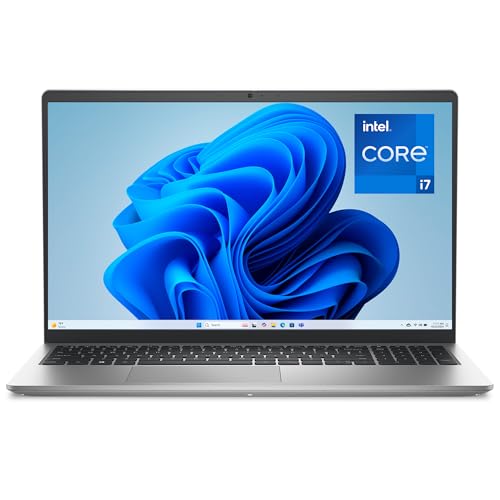
- ProcessorIntel Core i7-1355U (13th Gen, 10-core, up to 5.0GHz, 12MB cache)
- GraphicsIntel UHD Graphics (integrated)
- Memory16GB DDR5 (DDR4 configs also sold)
- Storage512GB SSD (1TB config also available)
- Display15.6-inch FHD, 120Hz, 250 nits, WVA anti-glare
- Weight3.59 lbs
A 120Hz panel on a plain office laptop is unusual, and for Roblox it is the interesting specification on this machine. It maps to the 120 FPS option in the client’s Maximum Framerate menu, which means a household that does not want a black plastic gaming laptop can still leave the default 60 FPS cap behind.
The i7-1355U boosts to 5.0GHz, which is the figure that counts for a script-heavy experience, and 16GB of DDR5 puts Studio well above Roblox’s recommended memory. Intel UHD graphics are the weak link, so expect to sit lower on the graphics quality slider than the gaming machines here.
Configuration care is required. LaptopMedia reviewed the i5-1334U version with 8GB of single-channel memory rather than the i7 and 16GB here, and its warning applies across the line: this model is sold in variants that differ in webcam, USB-C capability and chassis material, and the reviewed panel showed weak color coverage plus aggressive PWM below maximum brightness. Read the listing carefully before ordering.
On the positive side, the same teardown found two SODIMM slots and a standard M.2 drive, so memory and storage are both fixable later — the opposite of the Vivobook Go’s situation.
Pros
- 120Hz in a non-gaming chassis, so higher Roblox framerates come without gaming-laptop styling
- 5.0GHz peak clock suits the single-threaded side of the engine
- Two SODIMM slots mean memory can grow as Studio projects do
Cons
- Integrated UHD graphics force a lower quality slider than any discrete-GPU pick here
- Multiple configurations share the model name, so the wrong listing gets you a worse machine
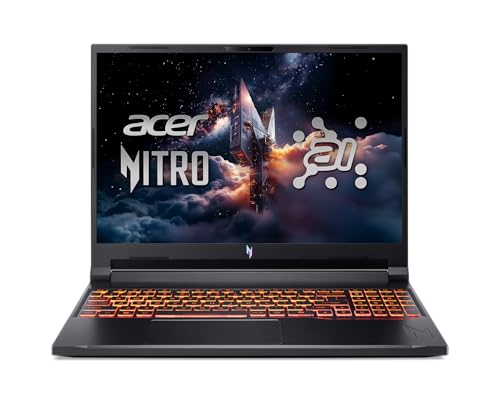
4. Acer Nitro V 16 (Best Mid-Range Gaming Pick)
Best Mid-Range Gaming Pick
Last update on 2026-10-22 / Affiliate links / Images from Amazon Product Advertising API
- ProcessorAMD Ryzen AI 5 340 (2.0GHz, up to 59 platform TOPS / 50 TOPS NPU)
- GraphicsNVIDIA GeForce RTX 5060 (8GB, MGP 95W) + integrated AMD Radeon 840M
- Memory16GB DDR5 5600MHz
- Storage512GB Gen4 SSD
- Display16-inch WUXGA IPS, 180Hz
- Weight5.4 lbs
Sixteen inches at 1920×1200 is a better shape for Studio than a 15.6-inch 16:9 screen. The extra vertical space swallows the Explorer and Properties panels without squeezing the viewport, and Roblox’s recommended 1600×900 minimum is comfortably exceeded.
The 180Hz refresh rate sits between two Roblox framerate options rather than on one. Set the client to 144 FPS and the panel simply has margin to spare, which is a harmless place to be.
LaptopMedia’s review covered the Ryzen AI 7 350 with an RTX 4050 rather than the Ryzen AI 5 340 and RTX 5060 in this listing, so treat its benchmark numbers as belonging to a different machine. Two chassis findings still apply: the base 1200p panel measured only 57% sRGB coverage, and internally there are two DDR5 SODIMM slots and two M.2 bays plus a user-replaceable battery.
That upgrade path is the argument for this one over the LOQ. Roblox will not need 32GB, but a machine that will still be useful in four years might.
Pros
- 16:10 panel gives Studio real vertical room for the Explorer and Properties docks
- Two memory slots and two drive bays keep the machine relevant long after Roblox stops being the main workload
- Gigabit Ethernet removes Wi-Fi as a variable in latency-sensitive experiences
Cons
- The base panel’s narrow color coverage makes it a poor choice if you also edit thumbnails or artwork
- At 5.4 lbs it is the heaviest machine here outside the flagship
5. Acer Predator Helios Neo 16 AI (Best for 240 FPS)
Best for 240 FPS
Last update on 2026-10-22 / Affiliate links / Images from Amazon Product Advertising API
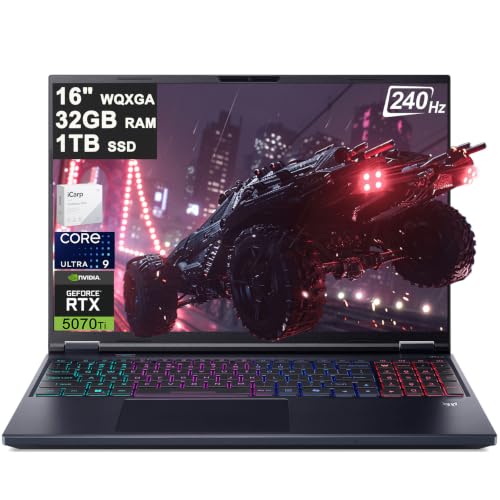
- ProcessorIntel Core Ultra 9 275HX (24-core, 2.7-5.4GHz, 40MB cache)
- GraphicsNVIDIA GeForce RTX 5070 Ti (12GB)
- Memory32GB DDR5-6400
- Storage1TB PCIe Gen4 SSD
- Display16-inch WQXGA IPS, 240Hz, 500 nits, 100% DCI-P3
- Weight5.95 lbs
Only one Roblox setting justifies this machine, and it is the top one. The client’s highest option is 240 FPS, this panel refreshes at 240Hz, and the Core Ultra 9 275HX peaks at 5.4GHz — the combination that gives a competitive player the best chance of actually reaching that number in a busy experience.
Everything about it is oversized for Roblox alone. Thirty-two gigabytes, an RTX 5070 Ti and a 100% DCI-P3 screen are specifications you buy because Roblox is not the only thing you play, and because Studio work with heavy lighting and imported meshes benefits from the 24-core count in a way the client never will. If that is the situation, our roundup of RTX 50-series machines puts this tier in wider context.
Notebookcheck reviewed the OLED sibling of this model, sold as the Helios Neo 16S AI, on the same Core Ultra 9 275HX and RTX 5070 Ti pairing. It measured 52 dB(A) in Performance mode and 57 dB(A) in Turbo, and found the GPU running roughly 10% below the average RTX 5070 Ti. The panel differs between the two models, so those display measurements do not carry over.
Fifty-seven decibels is loud. For Roblox specifically you will rarely provoke it, since the engine cannot load this GPU heavily, but the ceiling is there.
Pros
- 240Hz panel meets Roblox’s highest framerate setting exactly
- 5.4GHz peak clock is the best single-core figure among the Windows picks here
- 24 cores and 32GB make Studio lighting bakes and asset imports notably quicker
- Bright, color-accurate screen doubles as a workspace for thumbnails and video
Cons
- Loud under sustained load in Notebookcheck’s testing of the sibling model
- Comfortably the most expensive way to play a game that asks for 1 GB of RAM
6. Apple MacBook Air 13-inch M5 (Best Mac for Roblox)
Best Mac for Roblox

Last update on 2026-10-22 / Affiliate links / Images from Amazon Product Advertising API
- ProcessorApple M5 (10-core CPU)
- GraphicsApple M5 10-core GPU (integrated)
- Memory16GB
- Storage512GB SSD
- Display13.6-inch Liquid Retina, 2560×1664, 60Hz
- Battery18 hours
macOS is the second platform Roblox supports for both halves of the job — the client installs on macOS 10.13 and up, and Studio ships as a Mac disk image. That makes the Air the only non-Windows machine here that a creator can actually use.
Single-core speed being the Roblox currency, the M5 is unusually well suited. Notebookcheck, reviewing the 15-inch M5 Air rather than this 13-inch model, called it the fastest single-core processor you can buy with quite a margin, and found that under a 30-minute sustained load the fanless chassis stayed within about 10% of the actively cooled MacBook Pro 14.
Silence is the other reason it fits. There is no fan, so a long Studio session produces no noise at all, and the 18-hour battery rating means a build session away from an outlet is realistic in a way it is not on any Windows pick here.
Mac buyers, read the framerate section again. Roblox introduced the Maximum Framerate setting on Windows first and described Mac support as planned for a future date. Pair that with the Air’s 60Hz screen and high framerates are not part of this machine’s pitch.
Pros
- Class-leading single-core speed is precisely what the Roblox engine leans on
- Runs Studio as well as the client, unlike every Chromebook
- Completely silent, with battery life that makes untethered building practical
Cons
- 60Hz display and Windows-first framerate options rule out high-refresh play
- Memory and storage are fixed at purchase, so buy the configuration you will still want in three years
7. ASUS Vivobook 18 (Best Large Screen for Roblox Studio)
Best Large Screen for Studio

Last update on 2026-10-22 / Affiliate links / Images from Amazon Product Advertising API
- ProcessorAMD Ryzen 7 260 (8-core/16-thread, XDNA NPU up to 16 TOPS)
- GraphicsAMD Radeon Graphics (integrated)
- Memory32GB DDR5-5600
- Storage1TB SSD
- Display18.4-inch WUXGA IPS, 144Hz, anti-glare, 300 nits
- Battery17 hours
Studio is a panel-heavy application, and 18.4 inches is the cheapest way to stop fighting it. Explorer, Properties, the Output window and the viewport all fit at once, and the 144Hz refresh rate means play sessions on the same machine are not stuck at 60 FPS either — an unusual pairing on an integrated-graphics laptop.
Thirty-two gigabytes is four times Roblox’s recommended Studio figure. That is the buffer for the situation Studio users actually live in: a large place file open, a playtest running and a browser full of documentation.
LaptopMedia’s review used the Ryzen AI 7 445 rather than the Ryzen 7 260 in this listing, but panel and chassis measurements carry across: 352 cd/m² brightness, 97% sRGB, and a backlight that does not use PWM to regulate brightness. It also recorded 10 hours and 35 minutes of video playback from the 70Wh battery.
The compromise is portability. This is a desk machine at 5.73 lbs with an 18.4-inch footprint, and it will not go in a school bag.
Pros
- 18.4-inch screen removes the constant panel-shuffling that makes Studio tiring on small laptops
- 144Hz on an integrated-graphics laptop is rare and lets you leave the 60 FPS default behind
- 32GB gives Studio room that Roblox’s own recommendation does not even ask for
- Flicker-free, anti-glare panel measured at 352 cd/m² suits long evening sessions
Cons
- Too large and heavy to carry regularly; treat it as a desk fixture
- Integrated Radeon graphics limit how far right you can push the quality slider
8. Lenovo Chromebook Plus 14 (Best Chromebook for Playing Only)
Best Chromebook for Playing Only
Last update on 2026-10-22 / Affiliate links / Images from Amazon Product Advertising API
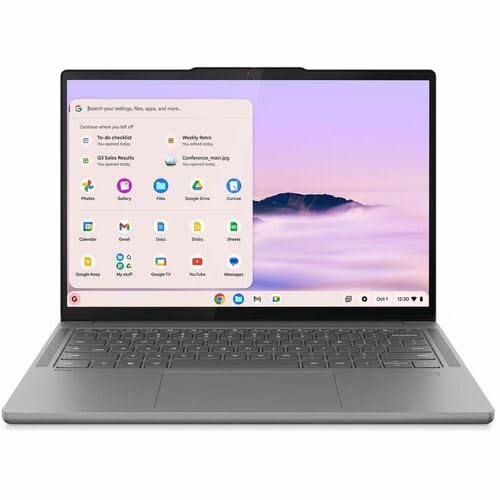
- ProcessorMediaTek Kompanio Ultra 910
- GraphicsArm Immortalis-G925 (integrated)
- Memory16GB
- Storage256GB UFS
- Display14-inch OLED, 1920×1200, 100% DCI-P3, 400 nits
- Weight2.8 lbs
Recommending a Chromebook here needs a specific justification, and it is this: you are running the Android app from Google Play, not the PC client, and Studio is not available at all. Buy this only if the person using it plays Roblox and has no interest in building it.
Within that boundary it is the strongest option. The Kompanio Ultra 910 is an Arm chip built for exactly the kind of mobile-derived workload the Roblox Android client is, and Notebookcheck measured 7,659 points in Geekbench 6.7 multi-core — well ahead of the Intel i3-N305 Chromebooks it compared against at 4,329.
The same review confirmed the machine is completely silent during operation, with the OLED panel measuring 379 cd/m² and a Delta E of 1.65, and flagged its glossy surface as distractingly reflective in bright rooms.
Plan the input method before you buy. Roblox’s own Chromebook page warns the app does not work with Bluetooth mice, so a wired USB mouse is the safe choice for anything beyond touchscreen play.
Pros
- Fastest Chromebook silicon here for the Android client Roblox actually ships on ChromeOS
- Fanless and light, so it is genuinely portable and silent in a shared room
- Excellent OLED panel for the money, useful well beyond gaming
Cons
- Roblox Studio does not run on ChromeOS, so a future creator will need a second machine
- Bluetooth mice are unsupported by the Roblox app, forcing a wired pointer
- Glossy screen reflects badly in bright rooms
Recommended Accessories
Roblox asks little of a laptop, so the useful add-ons are about comfort during long sessions and about giving Studio the screen space it wants.


Last update on 2026-10-22 / Affiliate links / Images from Amazon Product Advertising API
Which Roblox Laptop Should You Buy?
| Laptop | Best for | Key reason |
|---|---|---|
| Lenovo LOQ 15i | Playing and building on one machine | HX-class clocks with a 144Hz panel |
| ASUS Vivobook Go 15 | Casual play on a tight budget | Clears Roblox’s published floor for the least money |
| Dell 15 Laptop | Households that do not want a gaming laptop | 120Hz panel and a 5.0GHz peak clock |
| Acer Nitro V 16 | Buyers who want an upgrade path | 16:10 screen, two memory slots, two drive bays |
| Acer Predator Helios Neo 16 AI | Competitive play at the client’s ceiling | 240Hz panel and 5.4GHz single-core peak |
| Apple MacBook Air 13-inch M5 | Mac users who also build | Fastest single-core speed, silent, runs Studio |
| ASUS Vivobook 18 | Serious Studio work at a desk | 18.4-inch 144Hz screen with 32GB of memory |
| Lenovo Chromebook Plus 14 | Playing only, never building | Fastest Chromebook chip for the Android client |
Roblox Laptop FAQ
Do I need a gaming laptop to play Roblox?
No. Roblox publishes a floor of a 1.6GHz processor, 1 GB of RAM and DirectX 10 feature-level graphics, and its own guidance endorses a laptop under three years old with integrated graphics. A gaming laptop buys you higher framerates and headroom for other games, not the ability to run Roblox at all.
Is Roblox more CPU-dependent than GPU-dependent?
The engine leans heavily on the processor. Roblox states that scripts execute sequentially by default, so a script-heavy experience loads one core hard unless the creator has rewritten it with parallel Luau. A high single-core boost clock therefore does more for your framerate than a bigger graphics card.
How much RAM do I need for Roblox and for Roblox Studio?
Roblox recommends 1 GB of memory to run the client on Windows 10 or 11. Roblox Studio’s published minimum is 3 GB with 8 GB recommended. In practice 8 GB is the floor for building and 16 GB is the comfortable figure once a browser and a playtest are open alongside Studio.
Can I play Roblox on a Chromebook?
Yes, through the Google Play Store. Roblox says the Chromebook experience “uses the Android version of our Mobile App”, so you get the mobile client rather than the PC one, and Roblox notes the app does not work with Bluetooth mice.
Does Roblox Studio run on a Chromebook?
No. Roblox distributes Studio only as a Windows executable and a Mac disk image, with no ChromeOS build listed on its install page. A Chromebook is a play-only device for Roblox.
Can I run Roblox on Linux?
Not supported. Roblox’s requirements page states that Roblox is not supported on Linux, and the Hyperion anti-tamper system that ships with the Windows client blocked Wine in early 2024. Roblox does not officially document how Hyperion handles virtual machines, and community reports describe the client crashing inside one, so a VM is not a dependable workaround.
Is a 144Hz or 240Hz screen worth it for Roblox?
It can be, but only after you change a setting. Roblox added a Maximum Framerate option in May 2024 with choices of 60, 120, 144 and 240 FPS, and it defaults to 60 rather than to your display’s refresh rate. A 144Hz panel is the sensible target for most players; 240Hz only pays off for competitive play, and the setting arrived on Windows first.
Why is my Roblox framerate low on a powerful laptop?
Two common causes fit the engine’s behavior. The Maximum Framerate setting may still be at its 60 FPS default, and a heavily scripted experience may be limited by one saturated CPU core rather than by your graphics card. Lowering the manual graphics quality slider helps with the second, since it reduces the rendering work queued behind that thread.
Final Thoughts on Roblox Laptops
Decide first whether Studio is in the picture, because that single answer moves the budget more than any other factor and rules out ChromeOS entirely. If it is only about playing, spend on a high-clocked processor and a 120Hz or 144Hz panel and stop there. If building is coming, put the money into memory and screen area instead of into a graphics card the engine will never fully use.