Do you need an RTX 5080 or 5090 laptop? For most people, no. That’s not an attempt to talk you out of a bigger purchase — it follows from what each tier in NVIDIA’s current lineup is actually built for.
The RTX 50 series spans five tiers, from the RTX 5050 up to the RTX 5090, and the practical gap between neighboring tiers is easy to underestimate. Buy too little GPU and you’ll be dropping settings on new releases within a year. Buy too much and you’re paying flagship prices for performance a 1080p or 1440p panel can’t use. This guide matches the tier to what you actually play, not to the biggest number on the spec sheet.
Editor’s Pick


Last update on 2026-09-24 / Affiliate links / Images from Amazon Product Advertising API
The RTX 5070 is the tier this guide treats as the sweet spot: enough performance for 1440p ray tracing without the flagship price of the tiers above it.
- NVIDIA RTX 5070 (8GB GDDR7)
- 32GB RAM
- 1080p and 1440p gaming
- DLSS 4 support
What’s Inside
RTX 50 Series Laptop Buyer’s Guide
Understanding the RTX 50 Series Tiers
NVIDIA’s Blackwell-architecture RTX 50 series laptop GPUs launched in early 2026, spanning budget-tier 1080p gaming to flagship-class 4K across five product tiers:
- RTX 5050: Entry-level. 1080p gaming at high settings, the budget door into current-gen ray tracing and DLSS 4.
- RTX 5060: Mainstream 1080p, competent 1440p. A common tier in mid-range gaming laptops.
- RTX 5070 / 5070 Ti: Newegg’s 2026 gaming laptop guide frames the RTX 5070 Ti as the sweet-spot chip for real 1440p gaming without flagship pricing, in a thinner chassis than the tiers above it — though that same guide notes a thin chassis runs the GPU at a lower TGP than a bulkier one, so frame rates trail a larger laptop using the same chip.
- RTX 5080: High-end. Strong 1440p and capable 4K, aimed at buyers who want a multi-year buffer against new releases.
- RTX 5090: Flagship. Built for 4K with heavy ray tracing and path tracing, and for creative professionals doing GPU-accelerated rendering — not a laptop most gamers need.
VRAM: The Spec Most Guides Skip
Most RTX 5060 and many RTX 5070 configurations ship with 8GB of VRAM. That’s fine for 1080p and most 1440p gaming today. Maxed-out 1440p ray tracing in newer titles can push past 8GB, though, and that shows up as stuttering no amount of core performance fixes. If you’re buying for the long term at 1440p, look for a 12GB+ configuration (common on RTX 5070 Ti and above) rather than assuming a higher tier number alone solves it.
Unlike RAM or storage, VRAM on a laptop GPU is soldered directly to the graphics module — there’s no upgrade path after purchase, which is why the ceiling above is worth getting right on day one rather than assuming you can add capacity later the way you would with system memory.
Processor and Memory
Pair your GPU tier with a matching CPU — a current Core Ultra 7/i7 or Ryzen 7-class chip keeps up with an RTX 5070 or above without bottlenecking it, while entry tiers pair fine with a Core 5/i5 or Ryzen 5. 16GB of RAM is the practical floor for gaming in 2026; 32GB is worth it if you’re also streaming, running Discord and a browser alongside your game, or doing content creation on the side.
Display and Refresh Rate
Match your display to your GPU tier: a 1080p 144Hz+ panel suits the RTX 5050/5060 tier well, since that’s where the GPU can push high frame rates consistently. Stepping up to a 1440p or higher panel makes more sense once you’re in RTX 5070 territory or above, where the GPU has the compute to drive it.
RTX 50 Series Laptop Comparison Table





Last update on 2026-09-24 / Affiliate links / Images from Amazon Product Advertising API
Best RTX 50 Series Laptops in 2026 — Reviews
Five picks, one per tier — chosen to match a resolution and settings target, not the biggest benchmark chart.
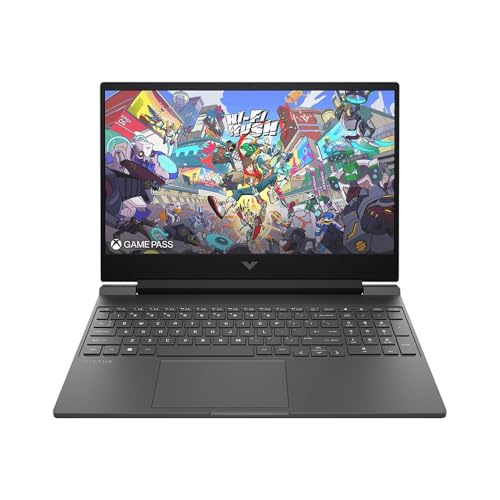
1. HP Victus 15 (Entry Tier, RTX 5050)
Entry Tier
Last update on 2026-09-24 / Affiliate links / Images from Amazon Product Advertising API
- GPUNVIDIA RTX 5050 (8GB GDDR6)
- ProcessorAMD Ryzen AI 5 340
- RAM16GB DDR5-5600
- Storage1TB NVMe SSD
- Display15.6-inch Full HD
- Battery70Wh
This carries the full RTX 50-series feature set — DLSS 4 support and hardware ray tracing at 1080p high settings — typically priced below RTX 5060 laptops. 1TB of storage as standard matters here: modern game installs eat storage fast, and you won’t be immediately juggling an external drive.
The keyboard uses a full layout with a number pad, a plus at this price tier. NotebookCheck’s Victus 15 review tested an Intel Core i5-13420H / 24GB configuration rather than this listing’s AMD Ryzen AI 5 340 / 16GB build, so treat its findings as directional rather than a direct measurement of this exact configuration. On audio, that review called the speakers “of average quality” without singling out bass or any specific weakness — budget for headphones if audio quality matters to you, but there’s no independent measurement of this AMD configuration’s sound. This is a straightforward budget entry into current-gen gaming, built for 1080p rather than 1440p.
Pros
- Current-generation RTX 50-series entry point with DLSS 4 support
- 1TB storage as standard
- Strong value at this price
Cons
- Built for 1080p — 1440p means dropping settings
- 8GB VRAM ceiling
- No independent review of this exact AMD/16GB configuration
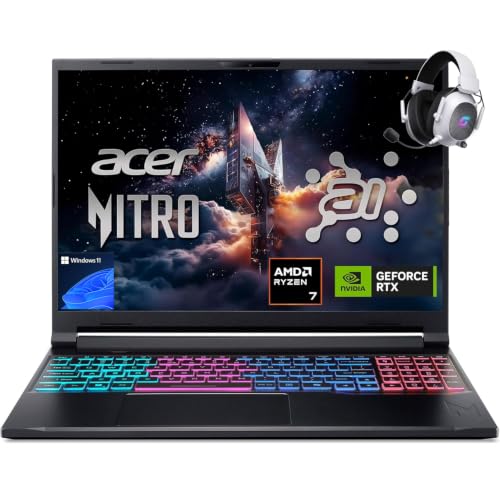
2. Acer Nitro V 16S AI (Mainstream 1080p, RTX 5060)
Mainstream 1080p
Last update on 2026-09-24 / Affiliate links / Images from Amazon Product Advertising API
- GPUNVIDIA RTX 5060 (8GB GDDR7)
- ProcessorAMD Ryzen 7 260
- RAM32GB DDR5-5600
- Storage1TB PCIe Gen4 SSD
- Display16-inch
- Battery76Wh, ~6h rated
The RTX 5060 Laptop GPU uses GDDR7 memory across NVIDIA’s entire 5060 lineup, a step up from the RTX 5050’s GDDR6 — a tier-wide upgrade tied to the GPU itself rather than something specific to this laptop.
32GB of RAM is well ahead of what most laptops at this price offer, leaving room for streaming or background apps alongside a game without a slowdown. PCWorld tested this Nitro V chassis (model ANV16-42) in its Ryzen 5 240 / RTX 5050 configuration rather than the Ryzen 7 260 / RTX 5060 build listed here, so its CPU and GPU performance results don’t carry over directly. Its battery result is the most useful data point available, since Acer uses the same 76Wh cell across trims: the cell outperformed Acer’s own six-hour rating, running past 12 hours in PCWorld’s video-playback loop and around 8 hours in a mixed browsing-and-writing test.
This tier runs 1080p at high settings and manages 1440p in less demanding titles — a reasonable ceiling before stepping up a tier.
Pros
- GDDR7 memory, standard across the RTX 5060 tier
- 32GB RAM, ahead of most laptops at this price
- Battery cell measured well past its rated runtime (on the sibling configuration tested)
Cons
- 8GB VRAM remains a ceiling for maxed 1440p ray tracing
- No independent review yet of this exact Ryzen 7 260 / RTX 5060 configuration
3. MSI Katana 15 HX (The Sweet Spot, RTX 5070)
The Sweet Spot
Last update on 2026-09-24 / Affiliate links / Images from Amazon Product Advertising API
- GPUNVIDIA RTX 5070 (8GB GDDR7)
- ProcessorIntel Core i9-14900HX
- RAM32GB DDR5 (up to 64GB configs available)
- Storage1TB NVMe SSD
- Display15.6-inch, Cooler Boost 5 dual-fan cooling
- Battery75Wh
Newegg’s 2026 gaming laptop guide names the RTX 5070 Ti one tier up as the sweet-spot chip for real 1440p gaming without flagship pricing. This guide reaches the same conclusion about the base RTX 5070 in this laptop: enough for 1440p without the price step of the 5080 and 5090 tiers above it. It’s the pick this whole guide is built around.
This is one of the more affordable ways into the RTX 5070 tier, and 32GB of RAM as standard (with 64GB available) means it won’t feel undersized a few years out. Fan noise is the trade-off: NotebookCheck’s review of the 17-inch Katana HX sibling, which shares the same Cooler Boost 5 cooling system, found noise under sustained load high enough to “practically force you to use headphones.” The 15-inch model reviewed here hasn’t been independently tested on its own, but the shared cooling hardware makes a similar noise profile likely.
The 8GB VRAM ceiling on this configuration matters most at the settings extreme — ray tracing pushed to maximum at 1440p rather than left on high — which is the specific case where the 5070 Ti configuration’s extra VRAM starts to pay for itself; short of that, this build doesn’t leave performance on the table.
Pros
- Best-value entry to the sweet-spot RTX 5070 tier
- 32GB RAM standard, 64GB configs available
- Strong price-to-performance for the RTX 5070 tier
Cons
- Loud under sustained load, per testing of the 17-inch sibling’s shared cooling system (this 15-inch SKU untested independently)
- 8GB VRAM — check the 5070 Ti configuration if you want more overhead at maxed 1440p
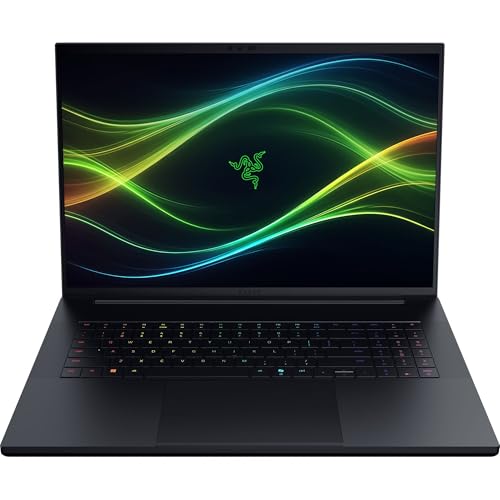
4. Razer Blade 18 (High-End, RTX 5080)
High-End
Last update on 2026-09-24 / Affiliate links / Images from Amazon Product Advertising API
- GPUNVIDIA RTX 5080 (16GB GDDR7, 175W TGP)
- ProcessorIntel Core Ultra 9 290HX
- RAM32GB DDR5-6400 (expandable to 128GB)
- Storage1TB SSD (dual M.2)
- Display18-inch
- BatteryVapor chamber cooling
The 16GB of VRAM here is a real step up from the 8GB tiers below — this is where maxed-out 1440p ray tracing and serious 4K become realistic rather than aspirational.
32GB of RAM, expandable to 128GB, and vapor chamber cooling for sustained performance make this a step into desktop-replacement territory. NotebookCheck’s review of this chassis measured 48.8 dB(A) in Performance mode against 55.9 dB(A) in Turbo mode — quiet by the standards of an 18-inch gaming laptop. That review tested the RTX 5090 configuration of the Blade 18, not the RTX 5080 build listed here; Razer uses the same chassis and cooling system across both GPU tiers, but this specific RTX 5080 configuration hasn’t been independently measured on its own.
Pros
- 16GB VRAM — a real jump from the 8GB tiers below
- RAM expandable up to 128GB
- Vapor chamber cooling for sustained performance
Cons
- Significant price jump from the RTX 5070 tier
- Overkill if 1080p or light 1440p is your actual use case
- This RTX 5080 configuration has no independent review of its own; the closest data point tested the RTX 5090 build in the same chassis
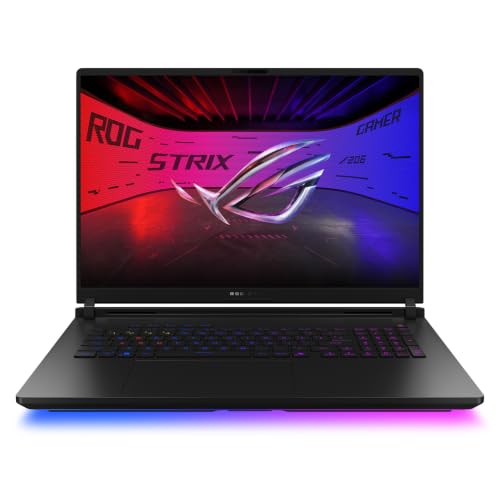
5. ASUS ROG Strix Scar 18 (Flagship, RTX 5090)
Flagship
Last update on 2026-09-24 / Affiliate links / Images from Amazon Product Advertising API
- GPUNVIDIA RTX 5090 (24GB GDDR7, 175W max TGP)
- ProcessorIntel Core Ultra 9 290HX Plus
- RAM32GB DDR5-6400
- Storage1TB PCIe Gen4 SSD
- Display18-inch
- Battery90Wh, vapor chamber + tri-fan cooling
To be direct about who this is for: not most gamers. The RTX 5090 is built for 4K with heavy ray tracing and path tracing, and for creative professionals doing GPU-accelerated 3D rendering or video work where extra compute translates into real time saved.
If that’s your use case, this delivers NVIDIA’s full Blackwell-architecture feature set — DLSS 4.5 with Dynamic Multi Frame Generation, full ray tracing, and the most GPU performance in the current lineup. Tom’s Hardware found the fans well-behaved for daily use, with footsteps and distant conversations still audible over the built-in speakers during gaming; it’s only once you push into the highest performance profile that the noise becomes something you’d want headphones for.
For 1080p or standard 1440p gaming, this is more laptop and money than the task needs — the RTX 5070 or 5080 above will serve you just as well for a fraction of the price.
Pros
- Most GPU performance in the current RTX 50 lineup
- 4K and path-tracing capability at native settings
- Best pick for GPU-accelerated creative work alongside gaming
Cons
- Most expensive pick on this list by a wide margin
- Overkill for the vast majority of gamers
Recommended Accessories




Last update on 2026-09-24 / Affiliate links / Images from Amazon Product Advertising API
Which RTX 50 Series Laptop Should You Buy?
| Best For | Pick |
|---|---|
| Entry Tier (1080p) | HP Victus 15 — RTX 5050 |
| Mainstream 1080p | Acer Nitro V 16S AI — RTX 5060 |
| The Sweet Spot | MSI Katana 15 HX — RTX 5070 |
| High-End 1440p/4K | Razer Blade 18 — RTX 5080 |
| Flagship | ASUS ROG Strix Scar 18 — RTX 5090 |
RTX 50 Series Laptop FAQ
What happened to GTX 1650 and 1660 Ti laptops?
NVIDIA discontinued the GTX 16-series in Q1 2024. New laptop listings built around the GTX 1650 or 1660 Ti have not appeared since. The direct successor tier is the RTX 5050/5060.
What’s the difference between RTX 5060 and RTX 5070?
Both use GDDR7 memory, so the jump between them comes from CUDA core count and clock behavior rather than memory bandwidth. In practice that shows up most at 1440p and in ray-traced titles, where the RTX 5070 pulls meaningfully ahead; the RTX 5060 stays strongest at 1080p with light 1440p.
Do I need 16GB of VRAM?
In this guide, only the Razer Blade 18 (RTX 5080, 16GB) and the RTX 5090 flagship carry more than 8GB — the entry, mainstream and sweet-spot picks all top out at 8GB. The deciding factor is whether you plan to max out 1440p ray tracing for several years of ownership; that’s when the 8GB ceiling on the first three picks becomes the limit before the GPU’s compute does.
Is the RTX 5090 worth it for gaming?
Rarely for gaming alone. Tom’s Hardware’s review of this exact Strix Scar 18 found the fans stay well-behaved until the highest performance profile is engaged — the setting that unlocks the RTX 5090’s full performance is also the one most gaming sessions don’t need. That extra GPU compute pays off in GPU-accelerated rendering and video export instead, where every added core shortens a wait time rather than raising a frame-rate number most 1080p or 1440p displays can’t show anyway.
Do I need a powerful CPU to match my GPU?
Yes, but the picks above already show the pattern in practice: the entry-tier Victus 15 pairs its RTX 5050 with a Ryzen AI 5 340, while the sweet-spot Katana 15 HX steps up to a Core i9-14900HX for its RTX 5070 — CPU tier moves with GPU tier rather than staying fixed. An underpowered CPU mostly shows up in CPU-heavy game logic and physics, not in the GPU-bound scenes a benchmark chart usually highlights.
Final Thoughts on RTX 50 Series Laptops
The question worth asking before you buy isn’t “what’s the most powerful laptop I can afford” — it’s “what resolution and settings do I actually play at.” Match the GPU tier to that answer, check the VRAM configuration if 1440p ray tracing matters to you, and you’ll end up with a laptop that fits your actual use case instead of a spec sheet that looks impressive but goes mostly unused.
The same GPU-tier logic applies to laptops for GoPro video editing, for anyone splitting a GPU budget between gaming and content creation.